
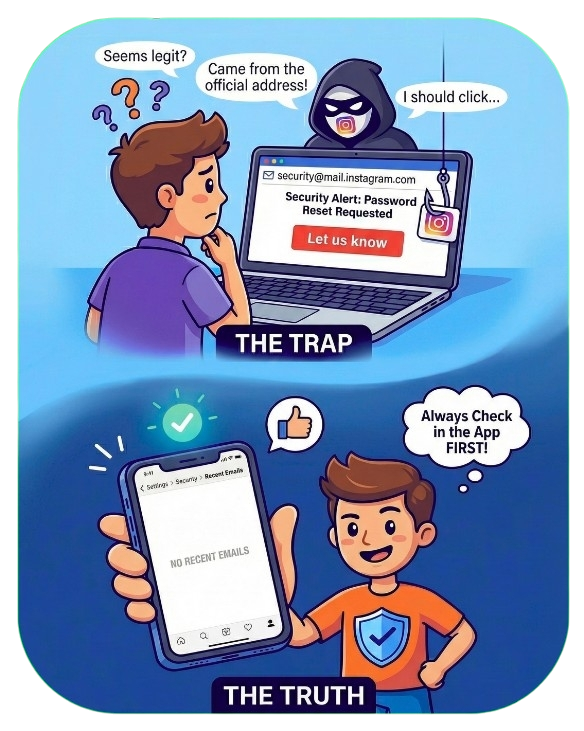
 A large scale phishing operation is actively targeting Instagram users worldwide using fake security alert emails appearing to come from a legitimate Instagram Notification Email Address. The messages claim a password reset was requested and prompt users to click a “Let us know” link if the activity was not authorized. Although the emails closely resemble legitimate Meta communications, the majority are designed to steal account credentials and bypass two factor authentication.
How the Scam Works
This scam is effective because it combines deception with legitimate platform behavior. Attackers are using SMTP spoofing to manipulate the sender field so emails appear to originate from an official Instagram address. At the same time, following the confirmed leak of 17.5 million Instagram accounts on BreachForums earlier this week, criminals are triggering real password reset requests using automated tools. This results in users receiving genuine looking security alerts initiated by attackers, not Instagram.
Credential Harvesting Phase
When a victim clicks the “Let us know” link, they are commonly redirected to a highly believable replica of the Instagram login page. These pages are built to capture usernames, passwords, newly changed credentials, and two factor authentication codes in real time. Once access is obtained, compromised accounts are quickly abused for scam ads, impersonation campaigns, crypto fraud, or sold through underground marketplaces.
Victim Reports and Surge Indicators
Online communities are reporting a sharp surge in near misses and account takeover attempts tied to this campaign. Many users believed the emails were legitimate due to the sender address, formatting, and timing of delivery.
I clicked the ‘Let us know’ link and it just opened the Instagram app, so I figured it was legitimate. Why would a scammer send me to the real app?
“It came from the official address. I even checked Instagram’s help pages and they list that exact email.”
“I am very careful with my accounts and mostly want to know whether this was targeted or sent out en masse.”
These reports highlight how attackers are exploiting trust in familiar branding and official looking infrastructure to bypass user skepticism.
How to Verify Legitimate Emails
Email addresses alone can no longer be trusted and the only reliable method to verify Instagram communications is inside the app itself. Users must navigate to Settings, then Accounts Center, followed by Password and Security, and finally Recent Emails. If the message does not appear in this section, it is a scam.
What to Do If You Receive One
Users should not click any links or buttons contained in the email, including those claiming to secure or confirm account activity. After verifying the message inside the Instagram app, the email should be deleted immediately. Users should review active login sessions, remove unfamiliar devices, and enable two factor authentication using an authenticator app rather than SMS. If the same password was used on other platforms, those credentials should be changed without delay, as the 17.5 million account data leak is actively being exploited.
This scam demonstrates how modern phishing campaigns exploit legitimate systems, verified data breaches, and psychological pressure to manufacture trust. The emails look real because, in some cases, parts of the process are real. Awareness, patience, and in app verification remain the most effective defenses.
- Log in to post comments